Terraform and OpenTofu orchestration on GitHub Actions ยท Apache-2.0

Terraform applies in dependency order, on your own GitHub Actions runners

Stackorder is a free, open-source (Apache-2.0) orchestrator for Terraform and OpenTofu on GitHub Actions: it plans every affected stack on each pull request, applies them in dependency order and checks for drift on a schedule. The server you host never holds cloud credentials.

The demo runs on one machine, with no GitHub App and no AWS account. View the source on GitHub.

Built for

  • GitHub.com
  • S3 state
  • AWS roles through GitHub OIDC
  • Terraform or OpenTofu

Version 0.1.0, released . Read the changelog.

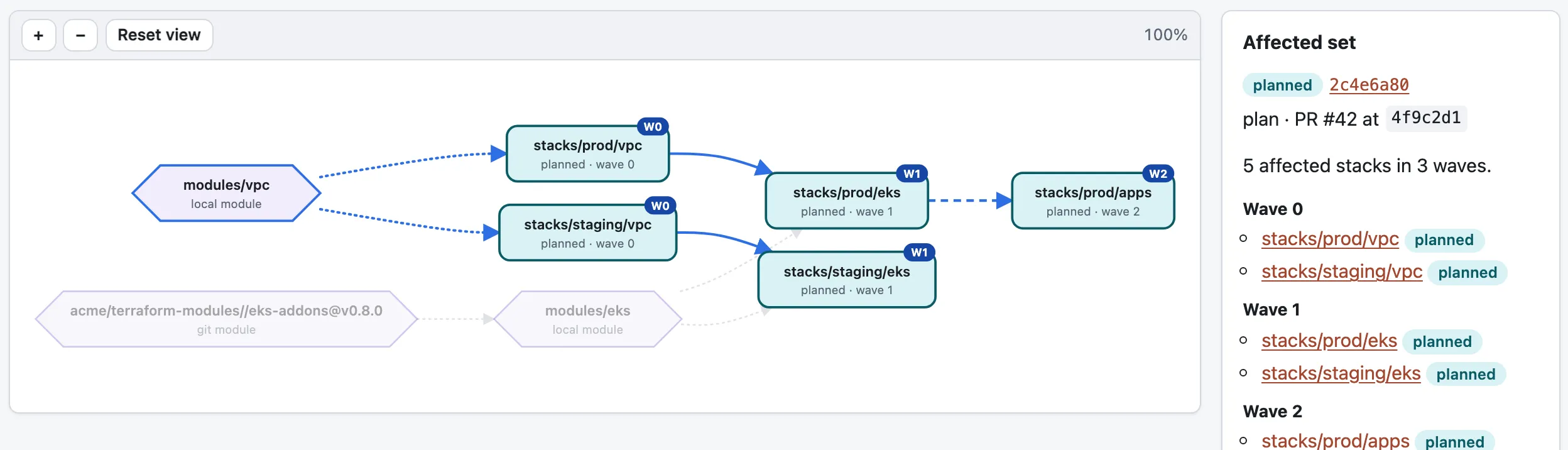
Stackorder's dependency graph for the repository acme/infra, replaying a pull request plan. A change to the local module modules/vpc affects five stacks: stacks/prod/vpc and stacks/staging/vpc in wave 0, stacks/prod/eks and stacks/staging/eks in wave 1, and stacks/prod/apps in wave 2. A side panel lists the same waves.
In acme/infra, one change to modules/vpc reaches five stacks in three waves. Screenshots show sample data.
stackorder affected --base main
WAVE  STACK                REASONS      ENVIRONMENT
0     stacks/prod/vpc      module       production
0     stacks/staging/vpc   module       staging
1     stacks/prod/apps     reads_state  production
1     stacks/prod/eks      dependent    production
1     stacks/staging/apps  dependent    staging
One change to modules/vpc in stackorder/example-infra reaches five stacks in two waves.

What Stackorder does

  • Plans on every pull request

    Each push plans every affected stack as its own GitHub Actions job, with a stackorder/plan check per stack, one sticky comment with a section per stack, and the plan file as an artifact.

  • Applies in dependency order

    Affected stacks apply in waves. The next wave starts only when every stack in the current one has finished and none failed; a failed stack blocks its dependents.

  • No cloud credentials on the server

    Jobs assume your AWS roles with their own GitHub OIDC token. The server sees metadata and redacted, capped plan text; never cloud credentials or state.

  • Open source and self-hosted

    Apache-2.0. One container of about 30 MB and a Postgres database, designed to fit a 0.25 vCPU / 512 MB Fargate task.

How it works: pull request, plan, then apply in waves

GitHub runs plans on every push to a pull request. The server dispatches applies one dependency wave at a time. That split keeps the server small and lets plans keep working when it is down.

The runner authenticates to the server with its GitHub OIDC token; they share no secrets.

  1. A push to a pull request resolves the graph

    GitHub runs stackorder-plan.yml, a thin wrapper around the reusable plan.yml. Its resolve job checks out the head, scans the repository, uploads the dependency graph to the server and gets the affected stacks back as a job matrix.

  2. Every affected stack gets a plan

    One plan job per stack runs init and plan under the plan role, runs the repository's hooks, redacts the output and uploads the plan file as an artifact. The server posts a check for each stack and keeps one sticky comment on the pull request.

  3. An apply request passes the gate

    A stackorder apply comment, or the merge itself in on_merge mode, goes through the apply gate: who asked, the pull request's state and approvals, fresh plans on the head commit, named policy checks and locks.

  4. Applies run in dependency waves

    The server locks every affected stack and dispatches stackorder-run.yml once per wave and GitHub environment. Each job runs under its stack's environment, so environment reviewers and the AWS role's trust policy stay the hard gates.

  5. Drift checks run on a schedule

    On drift.schedule, the server dispatches a drift check for each stack and can keep one GitHub issue per stack that has drifted.

stackorder affected --base main
WAVE  STACK                REASONS      ENVIRONMENT
0     stacks/prod/vpc      module       production
0     stacks/staging/vpc   module       staging
1     stacks/prod/apps     reads_state  production
1     stacks/prod/eks      dependent    production
1     stacks/staging/apps  dependent    staging
The CLI works on a laptop too: one change to modules/vpc in stackorder/example-infra reaches five stacks in two waves. It exits with code 2 when stacks are affected.

Features

Everything below ships in version 0.1.0. Screenshots show sample data.

Terraform stack dependencies: a graph of stacks, modules and repositories

Stackorder scans your repository for stacks: directories under stacks/**, or the globs you set in stacks.discover, that contain a backend "s3" block. It builds a graph from three kinds of edge. A change plans every stack it reaches, and applies follow the graph.

depends_on
Declared in a stack's .stackorder.yaml. It orders the run and propagates changes, and it can name a stack in another repository.
uses_module
Parsed from module sources, through nested local modules, so a change to a local module plans every stack that uses it.
reads_state
Inferred from a terraform_remote_state data source whose bucket and key match another stack's backend. Promote it with depends_on or suppress it with ignore_inferred.
stackorder graph
9 stacks, 3 modules, 8 edges

infra/kyc:production

infra/kyc:staging

infra/registry:shared
  depends_on   infra/kyc:production

stacks/legacy/dns

stacks/prod/apps
  reads_state  stacks/prod/vpc (inferred)

stacks/prod/eks
  depends_on   stacks/prod/vpc
  uses_module  stackorder/example-infra//modules/eks

stacks/prod/vpc
  uses_module  stackorder/example-infra//modules/vpc

stacks/staging/apps
  depends_on   stacks/staging/vpc

stacks/staging/vpc
  uses_module  stackorder/example-infra//modules/vpc

stackorder/example-infra//modules/common (local module)

stackorder/example-infra//modules/eks (local module)
  uses_module  stackorder/example-infra//modules/common

stackorder/example-infra//modules/vpc (local module)

warning: stacks/legacy/dns: inferred reads_state edge to stacks/prod/vpc suppressed by ignore_inferred
stackorder graph on stackorder/example-infra. It also prints DOT and JSON.
Terraform pull request automation with an apply gate

Comment stackorder plan, stackorder apply or stackorder unlock on a pull request, or apply on merge with apply.mode: on_merge. The default, before_merge, applies from a comment and merges after the checks are green. Before anything is dispatched, the gate checks:

  1. The requester: a member of allowed_teams, or anyone with push permission
  2. Pull request state and approvals: require_approvals, four_eyes, require_codeowner_review
  3. Fresh plans on the head commit, with plan artifacts when from_plan applies the saved plan
  4. Named checks recorded by your policy tools
  5. Stack locks

All failures come back together in one comment. GitHub Environments with required reviewers, and IAM trust policies pinned to the environment, stay the hard stops.

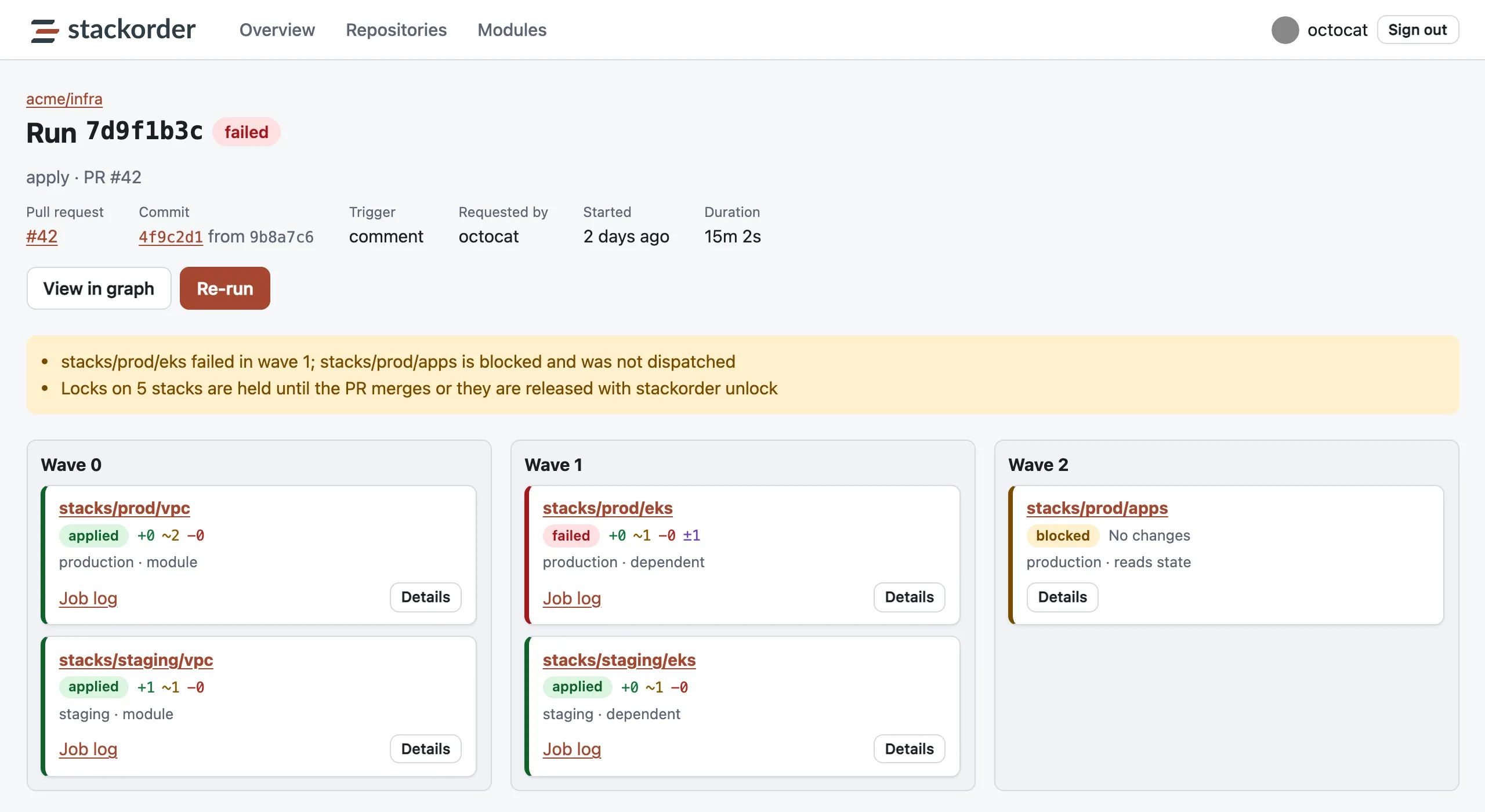
The run page for an apply of pull request #42 in acme/infra. Wave 0 applied stacks/prod/vpc and stacks/staging/vpc. In wave 1, stacks/prod/eks failed and stacks/staging/eks applied. In wave 2, stacks/prod/apps is blocked and was not dispatched. A notice says locks on five stacks are held until the pull request merges or they are released with stackorder unlock.
A failed stacks/prod/eks blocks its dependent stacks/prod/apps, and the stacks stay locked.

Terraform drift detection and stack locks

Set drift.schedule to a five-field cron expression and every stack gets a drift check, spread across the hour, running plan -detailed-exitcode with the plan role. With open_issue: true, Stackorder keeps one issue per stack, titled Drift detected in <key>, and closes it when the drift is gone. It never applies to fix drift.

Stack-level locks sit above Terraform's state lock. They are taken all or nothing before the first wave, released on merge or when the run completes, and can be released from a comment, the UI, the API or the CLI. Every release is audited.

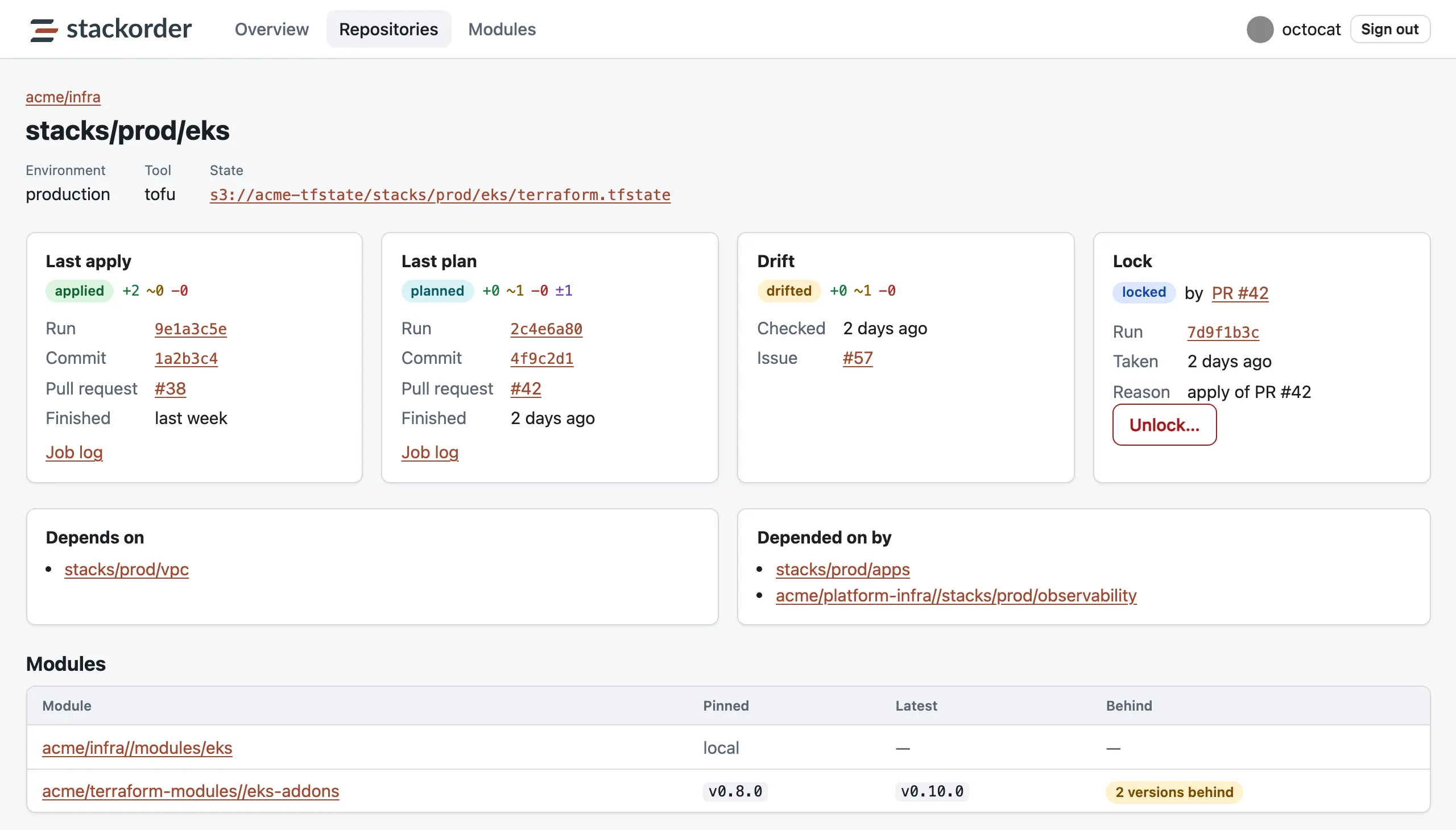
The stack page for stacks/prod/eks: environment production, tool tofu, and a link to its S3 state. Cards show the last apply, the last plan, drift detected with an issue, and a lock held by pull request #42 with an Unlock button. Below are the stacks it depends on and that depend on it, and the modules it uses, one of them two versions behind.
A stack page: runs, drift, the lock, dependencies both ways and module versions.

Module consumers and versions

Stackorder records local, git and registry modules and the stacks that use them. For a git module, a semver tag push records the version, and the module page lists every consumer with the version it pins and how many releases it is behind. Bumping is left to Renovate or Dependabot.

Only local modules propagate changes within a pull request; a git module reaches its consumers when they bump ref.

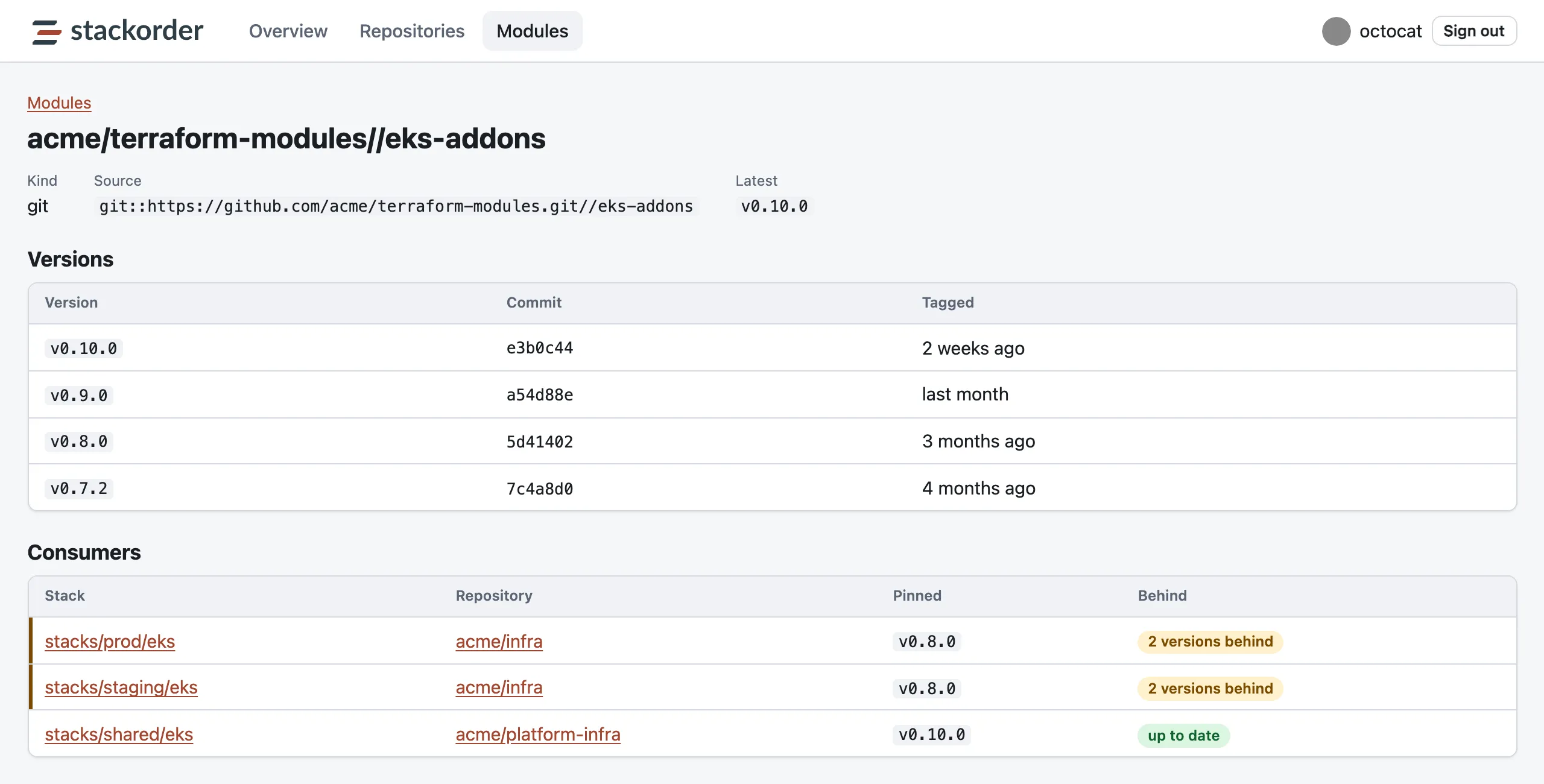
The module page for the git module acme/terraform-modules//eks-addons, latest version v0.10.0. A versions table lists v0.10.0, v0.9.0, v0.8.0 and v0.7.2 with their commits. A consumers table shows stacks/prod/eks and stacks/staging/eks in acme/infra pinned to v0.8.0, two versions behind, and stacks/shared/eks in acme/platform-infra up to date.

Stack instances for one directory per environment

A directory deployed once per environment becomes one stack per instance, written path:instance, each with its own state key, var files, environment, apply role, locks, checks and drift. Declare instances from var files, as a list or map, or from workspaces, and template backend_config, var_files, env, environments and depends_on with Go templates.

Coming from Terrateam, now Stategraph? The instances documentation maps its configuration to Stackorder's.

infra/registry/.stackorder.yaml

instances: [shared]
depends_on:
  - "infra/kyc:production"
backend_config:
  - infra/state.s3.tfbackend
  - 'key={{ trimPrefix "infra/" .Path }}/{{ .Instance }}.tfstate'

From stackorder/example-infra: infra/kyc becomes infra/kyc:production and infra/kyc:staging from its var files, and this stack depends on the production instance.

A web UI, a JSON API and Prometheus metrics

The server embeds a small web UI with GitHub sign-in: an overview, repositories, the dependency graph, and pages for each stack, run and module. It is read-only apart from unlock and re-run, which are audited.

The same data is in a JSON API with cursor pagination, and in Prometheus metrics with the stackorder_ prefix, covering runs, stacks, dispatches, drift, locks, webhooks, the queue and GitHub rate limits. Traces go out over OTLP HTTP.

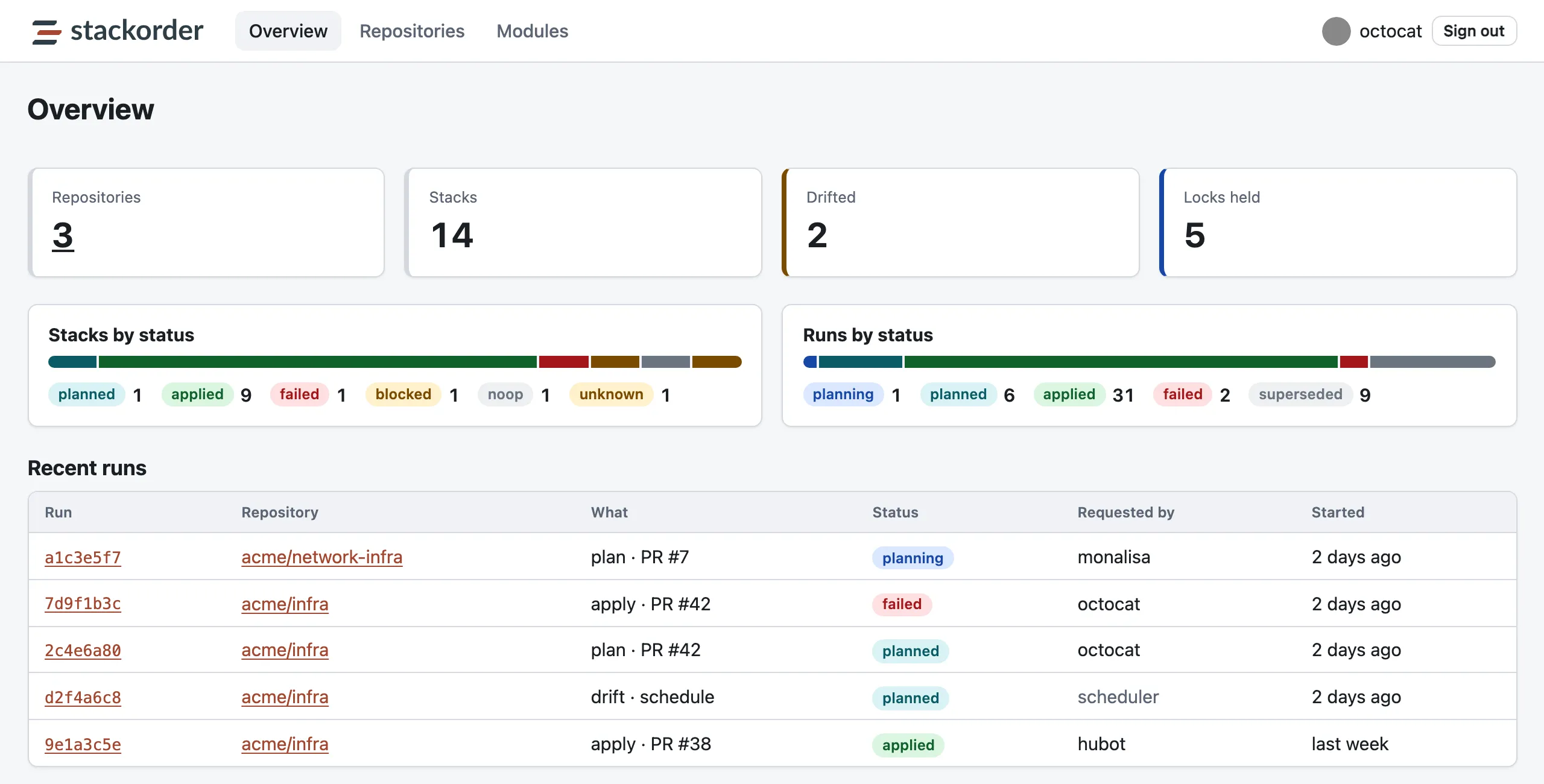
The Stackorder overview page: 3 repositories, 14 stacks, 2 drifted, 5 locks held. Bars break down stacks by status and runs by status. A recent runs table lists plan, apply and drift runs for acme/infra and acme/network-infra with their status, who requested them and when.
The overview: stacks, drift, locks and recent runs across the organization.

A compromised Stackorder server cannot change your infrastructure

The server has no cloud access and the runner holds no server secrets. The one action that changes anything, an apply, still runs under your GitHub environment's protection rules and your IAM role's trust policy.

A compromised Stackorder server can

  • Dispatch stackorder-run.yml in installed repositories
  • Post checks and comments
  • Read stackorder.yaml, plan summaries and capped plan text

It cannot

  • Read or write Terraform state
  • Assume any AWS role
  • Change workflow files or read repository secrets
  • Approve pull requests or pass an environment's required reviewers

Read every line of it

The server, the CLI, the embedded UI, the Terraform module that deploys the server, and the stackorder/actions workflows are all Apache-2.0.

The GitHub App asks for no Secrets, Administration, Environments or Workflows permission, and people sign in with the read:org scope only.

Two jobs, and nothing else

GitHub already provides most of the control plane: OIDC, repository permissions, CODEOWNERS, environments, check runs, secrets and compute. Stackorder adds what GitHub lacks, and its server does two jobs.

Dependency resolution
The graph of stacks, modules and the edges between them; the affected set for a change; applies ordered into waves; stack-level locks.
Observability
Every plan and apply recorded per stack and per commit, drift, the dependency graph, and which stacks consume each module at which version.

What it is deliberately not

  • A state backend. State stays in your S3 bucket.
  • A module registry. Modules stay in git.
  • A runner. Terraform runs on your Actions runners.
  • A policy engine. Run OPA, Checkov or Infracost in a hook; Stackorder records the verdict as a named check on the stack.
  • A secrets store. Secrets stay in GitHub.

How it compares

Terraform automation tools differ most in where Terraform runs, who holds your cloud credentials, and how dependent stacks are ordered.

ToolWhere Terraform runsWho holds cloud credentialsCross-stack ordering
AtlantisIts own serverThe Atlantis serverProjects in one atlantis.yaml
HCP Terraform (formerly Terraform Cloud)HashiCorp's VMs or your agentsHCP Terraform, stored or for each runRun triggers between workspaces; Stacks
Stategraph (formerly Terrateam)Your GitHub Actions or GitLab CI runnersYour CI runnersLayered runs within one repository
StackorderYour GitHub Actions runnersYour runners, through GitHub OIDCA graph of stacks, modules and repositories; applies in waves

Last reviewed . Terraform Cloud and Atlantis alternatives compared sets all 9 tools side by side on 16 features, with a source for every cell.

Get started

The getting started guide takes one repository from nothing to a first stackorder apply in ten steps. You need:

  • A GitHub organization where you can create and install GitHub Apps
  • An AWS account with an S3 bucket for state
  • Somewhere to run one container behind a public HTTPS URL, plus Postgres
  • Terraform or OpenTofu 1.10 or later for S3-native locking with use_lockfile; DynamoDB locking also works

Each repository adds a root stackorder.yaml, whose smallest valid form is version: 1, two workflow files, and IAM roles: one to plan, and one to apply per environment.

.github/workflows/stackorder-plan.yml

name: stackorder plan
on:
  pull_request:
    types: [opened, synchronize, reopened]
concurrency:
  group: stackorder-plan-${{ github.event.pull_request.number }}
  cancel-in-progress: true
jobs:
  plan:
    permissions:
      id-token: write
      contents: read
      actions: read
      checks: write
      pull-requests: read
    uses: stackorder/actions/.github/workflows/plan.yml@v1
    with:
      server-url: ${{ vars.STACKORDER_SERVER_URL }}
      aws-role-arn: arn:aws:iam::123456789012:role/stackorder-plan
      tool: tofu
    secrets: inherit

Star stackorder on GitHub to follow releases.

Frequently asked questions

Is Stackorder free and open source?

Yes. Stackorder and its GitHub Actions are open source under the Apache License 2.0, and the code is on GitHub. You host the server yourself: one container and a Postgres database.

Will it work with my setup?

Yes, if your code is on GitHub.com, your state is in S3 and your jobs can assume AWS roles through GitHub OIDC, with Terraform or OpenTofu. Version 1.10 or later gives S3-native locking, and DynamoDB locking also works. GitHub Enterprise Server can be configured but has not been tested. Stackorder is GitHub only by design, so it does not work with GitLab, Bitbucket or Azure DevOps, and version 0.1.0 supports the S3 backend only, with runner authentication built around AWS IAM roles. The roadmap lists what is planned.

Is Stackorder ready for production?

Try it on a non-production repository first: it is version 0.1.0, released on 2026-09-30. Unit tests, integration tests on Postgres, and end-to-end tests with Terraform 1.14 and OpenTofu 1.12 against LocalStack cover it; the default suites do not run against a real GitHub organization, real AWS or GitHub Enterprise Server. Applies fail closed and GitHub environments stay the final gate. The changelog lists every release.

Does Stackorder support OpenTofu?

Yes. Set tool: tofu at the root of stackorder.yaml or per stack. The end-to-end tests run Terraform 1.14 and OpenTofu 1.12.

How do I run Terraform on GitHub Actions for many stacks?

Add Stackorder's two workflow files. stackorder-plan.yml runs on each pull request and plans every affected stack as its own job; stackorder-run.yml runs when the Stackorder server dispatches an apply wave. Both call reusable workflows from stackorder/actions, which use no Docker. Stacks are found for you: every directory under stacks/**, or the globs in stacks.discover, that has a backend "s3" block.

How do I apply Terraform stacks in dependency order?

Stackorder builds a dependency graph of stacks and modules from explicit depends_on, from module sources, and from terraform_remote_state data sources that read another stack's S3 state. It layers the affected stacks into waves by longest path and applies one wave at a time. A dependency cycle fails the stackorder/resolve check with the cycle spelled out.

How do I detect Terraform drift from GitHub Actions?

Set drift.schedule in stackorder.yaml to a five-field cron expression. Stackorder dispatches plan -detailed-exitcode for each stack on GitHub Actions, spread across the hour, and with open_issue keeps one GitHub issue per drifted stack, closing it when the drift is gone. It never applies to fix drift; that stays a pull request.

What does the Stackorder server see?

Metadata and redacted, capped plan text; never cloud credentials or state. The CLI redacts private keys, tokens, password assignments and the values of secret-named variables before anything leaves the runner, and truncates plan text at 256 KB. With plan_output: summary only resource counts and addresses are sent.

What happens when the server is down?

Pull request plans still run, because GitHub triggers them, and their checks are marked unconfirmed. Applies are refused until the server is back: Stackorder fails closed.

What does it take to run the server?

One container of about 30 MB and a Postgres database, its only stateful dependency, behind a public HTTPS URL that GitHub can reach. Run it with Docker or Compose, on another container platform, or on ECS Fargate with the Terraform module in the repository; on first start, setup mode creates the GitHub App from a manifest. See deploying with a container and upgrades and backups.

Which tools does Stackorder replace?

For teams on GitHub that keep state in S3, it can take over the pull request workflow of Atlantis or Terraform Cloud: plans on every pull request, applies from a comment or on merge, ordered across stacks. It does not host state or modules, and it is not a policy engine. See Terraform Cloud alternatives compared, Stackorder as a Terraform Cloud alternative and Stackorder as an Atlantis alternative.

Can I move from Atlantis or Terrateam?

From Terrateam, now Stategraph: the instances documentation maps its configuration to Stackorder's. From Atlantis there is no migration guide yet. Stackorder finds stacks itself, as directories with a backend "s3" block, and you declare dependencies with depends_on in each stack's .stackorder.yaml; Stackorder vs Atlantis lists the other differences.

Where do I get help?

Open an issue on GitHub. The contributing guide explains how to take part.